
What are the key specificities of TinyMDM API?
An API, or Application Programming Interface, is a standardized set of methods that allows a third-party software or application to interact with a “provider” program.
A. What is an API used for?
A program with an API can be called by a third-party software or application to perform specific actions based on the requirements defined by that third-party software. For example, a company with an in-house development team can instruct them to build a program that calls another program via an API to perform actions tailored to the company’s specific needs.
B. Examples of TinyMDM API usage
The TinyMDM API can be used by your developers internally to perform multiple actions that streamline the management of your managed devices. Actions can be related to users, devices, policies, or more specifically to the TinyMDM Store, contacts, shared files, Wi-Fi networks, entities, or managers.
Here are a few examples:
- A developer can create a program that periodically reboots some or all devices enrolled in TinyMDM.
- Via the API, you can automatically retrieve device identifiers to display them in another application.
- A development team can set up an external tool outside of TinyMDM where websites can be added to the allowed sites of a policy.
- You can contact TinyMDM via our API to fetch information about device status (compliance status, Android version, installed applications, etc.) to display in an internal tool.
C. How does the TinyMDM API work?
1. API keys
To secure API calls so that only authorized users can make them, TinyMDM uses two API keys: a public key and a secret key, both required to use the API. These keys are accessible from the My Account tab in the TinyMDM console. To generate them, click Generate new API keys in the API Keys box.
Upon creating an account, no API key is displayed, and you must click Generate new API keys to reveal them:
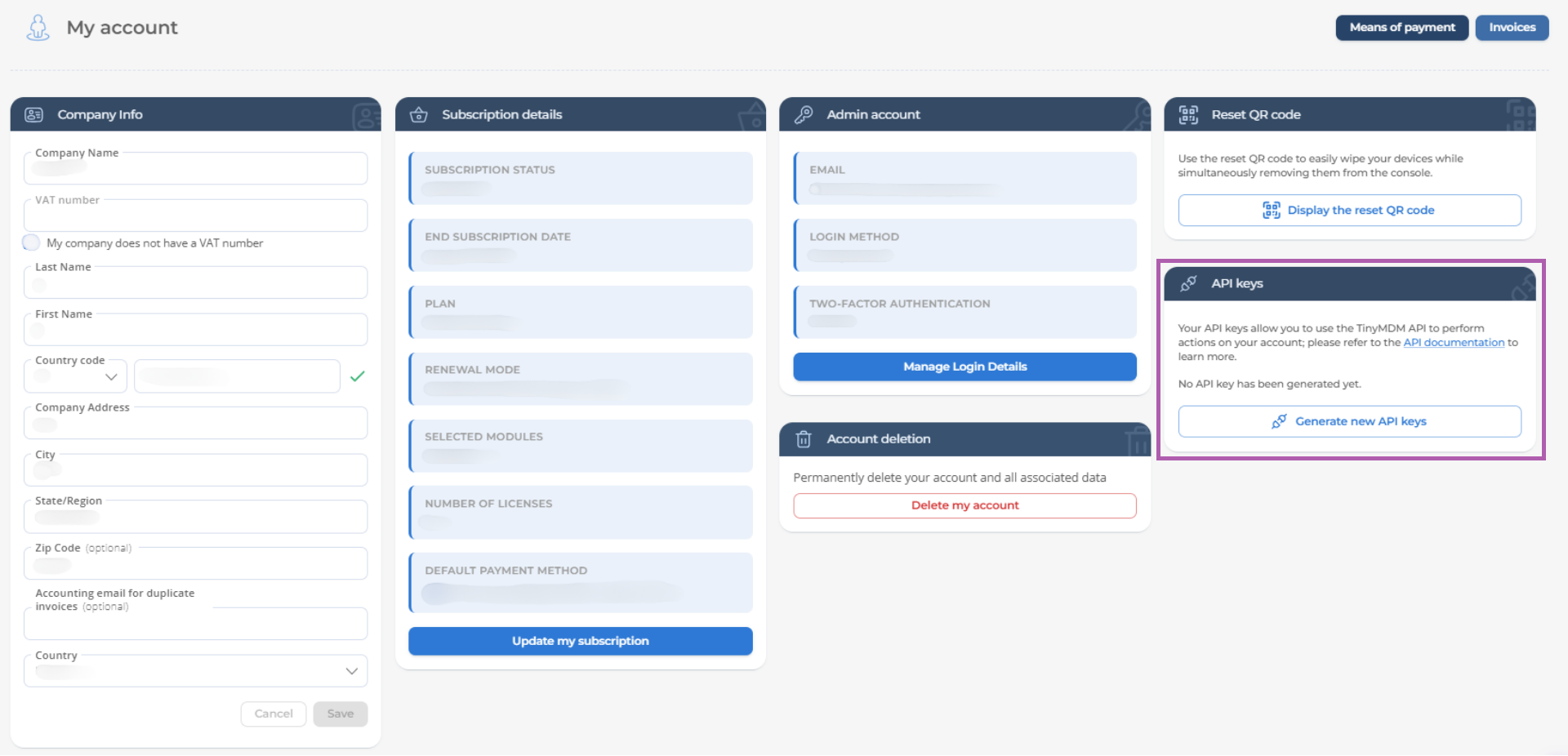
Warning: The secret key is only displayed once. If lost, both keys must be reset. The old keys will no longer be functional, and any program using them will need to be updated.
API keys different from the administrator’s are available in the My Account tab for managers. Manager keys are generated in the same way as administrator keys, but they work slightly differently.
2. Usage
1. As an account administrator
The account administrator is a person who can log in to the TinyMDM console using the email address used to create the account (as opposed to users logging in with manager access). The administrator’s API keys must be included in the headers of each API request using the values X-Tinymdm-Apikey-Public and X-Tinymdm-Apikey-Secret to authenticate the request.
The administrator can use all API calls exclusively on their own account.
2. As a manager
A manager is a user whose TinyMDM access was created by the administrator. A manager’s API keys must be included in the headers of each API request using the values X-Tinymdm-Manager-Apikey-Public and X-Tinymdm-Manager-Apikey-Secret. Additionally, each request made by a manager must include the X-Account-Id header containing the ID of the account on which the API call should be executed, as a single manager may have access to multiple accounts.
For a manager to use the API, the Full control over account with API permission must be granted by the administrator from the Managers and Structure tab.
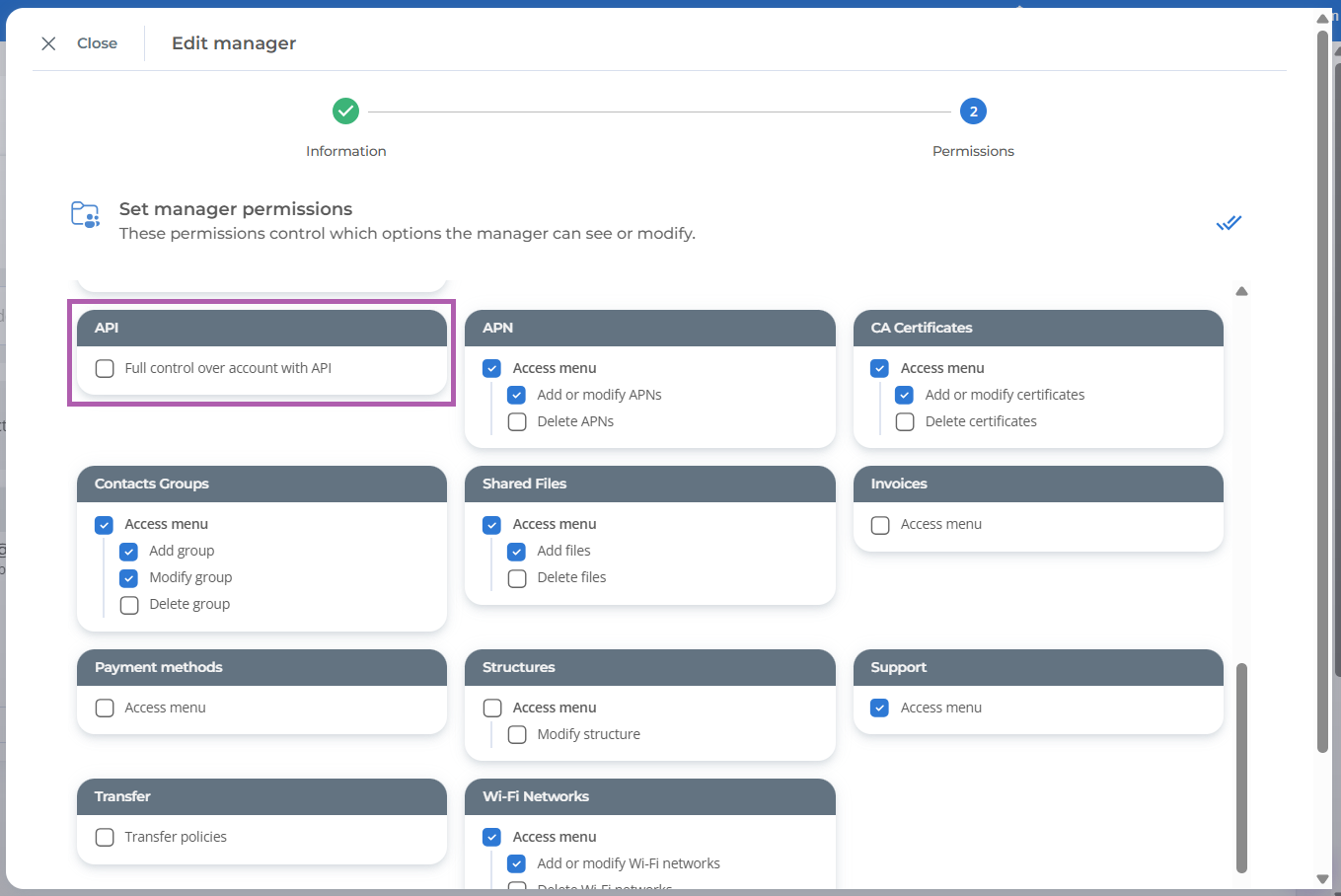
This permission grants full API access for the specified account. Even if the manager has restricted console access (restricted to devices within their entity or limited to certain tabs), their API access will not be restricted.
To retrieve the IDs of accounts on which a manager can execute calls, they must use the Get manageable accounts call. Only accounts for which the manager has API privileges will be returned.
Important : the maximum rate limit for API requests is 5 calls per second and 30,000 calls per day. These limits apply per account and include requests made by both the administrator and managers.
Feel free to check out all available API calls. If you have any questions regarding the TinyMDM API, don’t hesitate to reach out to our support team from your admin console under the Support tab.