
How to delay the installation of an update when a TinyMDM Store app is in use?
This feature allows you to suspend the update of a TinyMDM Store app if it is currently in use (open in the foreground). The update is thus put on hold until the app is closed or switches to the background. This postponement is valid for a maximum duration of 7 days after the update is downloaded. If the app remains continuously open in the foreground for these 7 days, the update will then be forced and will install automatically at the end of this period.
This option is particularly useful for devices configured in single app kiosk mode (learn more about this feature).
Prerequisites:
- The device must be in fully managed mode or kiosk mode.
- The device must run on Android 14 or a higher version.
- Log in to your administration console and go to the Policies tab.
- Click on Edit to modify the policy of your choice.
- Scroll down the policy to the Apps management menu.
- Below the list of allowed apps in this policy, open the Advanced apps management drop-down menu.
- Then check the option Delay the update of TinyMDM Store applications if they are currently in use.
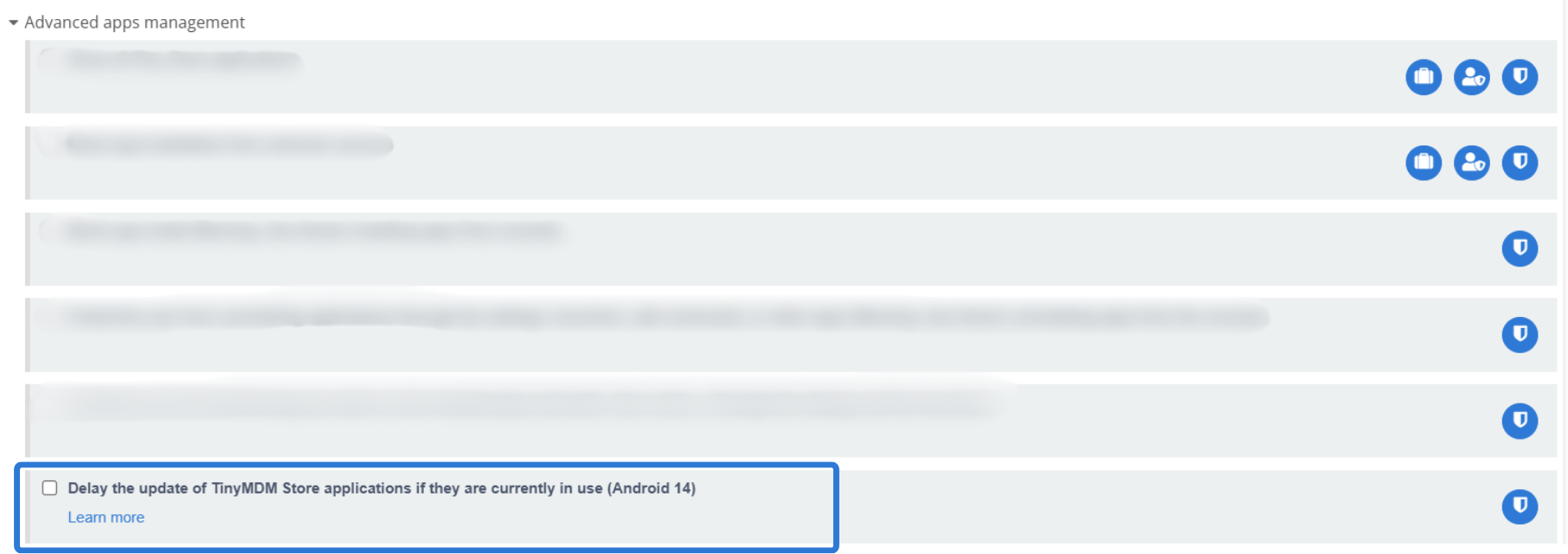
For this rule to apply, the option must be checked before the update is launched. If you launch the deployment of an update from the TinyMDM Store before enabling this feature, the app will update immediately, without any delay.
To learn how to update an app on the TinyMDM Store, please follow this tutorial.
If the update is relaunched from the policy, the one-week delay is not reset to zero. However, if a new update is published while the previous one has not yet been installed, receiving the update command for the new version resets the one-week delay to zero.