

Mobile device management has become essential for businesses. Between security needs, remote configuration, and app management, solutions are multiplying, but not all are created equal. Here is a selection of the top ten MDM (Mobile Device Management) solutions, with their pros and cons, to help you identify the one that will best meet your needs and budget.
Are you looking for the best MDM software? You’re in the right place! We’ve studied each solution for you, compared their strengths and limitations, checked user reviews, and then put together this comprehensive guide to help you choose the most suitable MDM software for your company’s needs.
1. TinyMDM
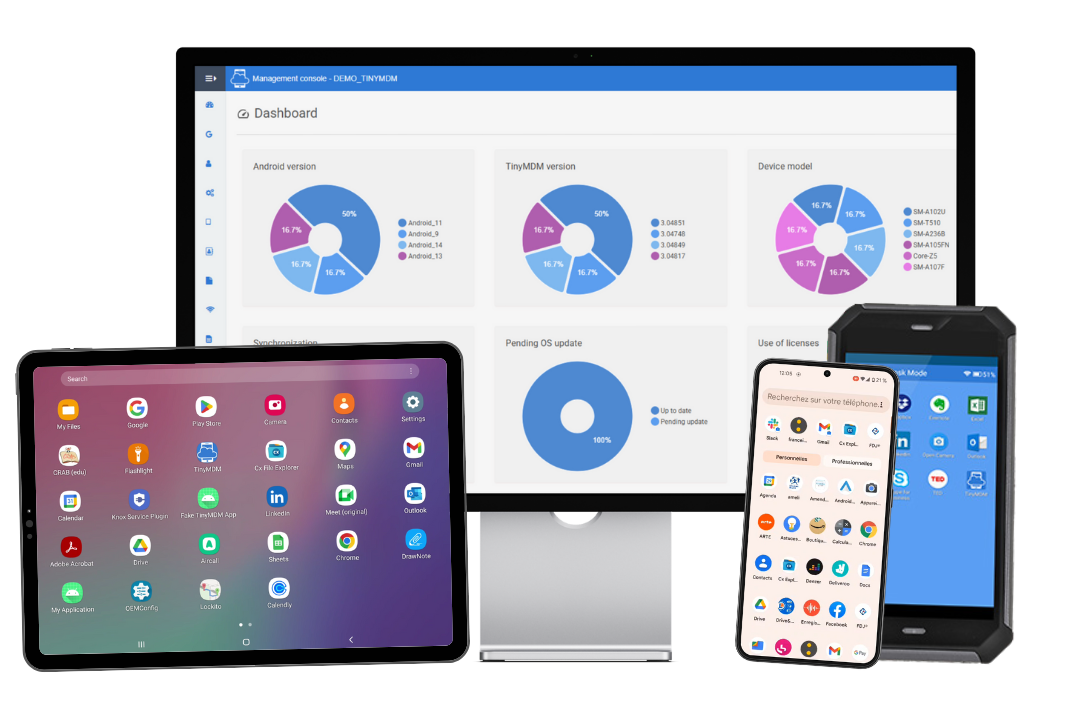
TinyMDM stands out with an intentionally simple and effective approach to mobile device management. Where many platforms rely on complex and expensive suites, TinyMDM focuses on the essentials: allowing IT teams to quickly manage and secure their mobile devices, without feature bloat or dependence on a heavy ecosystem.
The solution is particularly suited for organizations that want to maintain control over their Android fleets while keeping costs under control. Deployment is quick, the learning curve is intuitive, and daily administration does not require advanced technical skills.
TinyMDM covers the main MDM use cases: app management, location tracking, remote control, content sharing, messaging and security management through password and FRP management, internet filtering, remote lock and wipe… This pragmatic approach makes it a relevant choice for SMBs, local governments, retail networks, multi-site businesses, etc.
Depending on your needs, TinyMDM offers 4 different management modes: dedicated devices in kiosk mode (COSU), fully managed devices (COBO), company-owned devices for personal use (WPCO), or managing a secure work profile on personal devices (BYOD).
TinyMDM strengths:
- Clear and intuitive interface, designed for everyday use
- Fast deployment and simplified Android fleet management
- Essential features well-mastered (kiosk mode, app management, remote control, fleet tracking, etc.)
- Transparent and affordable pricing
- Android expert, official Android EMM partner
- Samsung expert, Samsung Knox Validated partner
Limitations:
- Does not support iOS, Windows, or Linux device management
Capterra Reviews:
2. IBM Security MaaS360
Built by IBM, Security MaaS360 is a cloud-based Unified Endpoint Management (UEM) solution designed to streamline the management and security of corporate device fleets. It supports a vast array of endpoints, from smartphones and tablets to Windows/macOS laptops and IoT devices. Deeply embedded within the IBM security ecosystem, MaaS360 delivers a robust framework for identity management, data encryption, and business app containerization.
A major differentiator for MaaS360 is its cognitive AI integration via IBM Watson. This empowers IT teams to analyze real-time telemetry data, proactively spot network vulnerabilities, and deploy custom security policies. Furthermore, the platform offers secure containerization to strictly separate personal and corporate data, simplifying BYOD deployments for large organizations.
Strengths:
- Total, secure control over devices including remote wiping, targeted restrictions, and geo-fencing.
- Centralized management and simultaneous deployment of applications across mixed device fleets.
- Comprehensive solution covering all compliance and mobile endpoint management needs.
Limitations:
- Initial setup and device enrollment are overly technical, tedious, and time-consuming.
- Customer support is frequently described as too slow and unhelpful for troubleshooting issues.
- Clunky administrative interface paired with frustrating sync issues, such as delayed GPS tracking and inconsistent notifications.
Capterra Reviews:
3. Hexnode UEM
Developed by Mitsogo, Hexnode UEM is a unified endpoint management solution built to centralize device administration across every major operating system (including Android, iOS, macOS, Windows, and tvOS). Its SaaS admin console provides a bird’s-eye view of your entire fleet, streamlining remote configuration deployments, location tracking, and automated compliance enforcement.
Where the platform truly shines is in its extensive kiosk mode and digital signage features. Hexnode makes it easy to lock devices down to specific apps, block system settings and web browsing, and fully customize the user interface. These robust lockdown capabilities make it a go-to choice for retail, healthcare, education, and hospitality environments.
Strengths:
- Highly responsive customer support that resolves issues quickly.
- Centralized multi-platform management (iOS, Android, Windows, macOS) featuring a strong Kiosk mode.
- Intuitive interface with quick onboarding, making initial device enrollment very straightforward.
Limitations:
- Desktop OS management (macOS and Windows) is less mature and detailed compared to mobile devices.
- Important features locked behind the more expensive top-tier pricing plans.
- Occasional policy deployment bugs and a vague, cumbersome device unenrollment process.
Capterra Reviews:
4. Microsoft Intune
Microsoft Intune is a cloud-based MDM and MAM solution built seamlessly into the Microsoft Endpoint Manager suite. Deeply integrated with Microsoft Entra ID (formerly Azure AD) and the broader Microsoft 365 ecosystem, it empowers you to manage diverse fleets encompassing Windows machines, Macs, and iOS/Android mobile devices. Its capabilities span the entire device lifecycle, from initial configuration to ongoing corporate data security.
Where Intune truly excels is in its advanced conditional access policies, which assess a device’s compliance and security health before granting entry to business apps like Outlook or Teams. By separating full device management (MDM) from targeted app protection (MAM), Intune provides the flexibility needed to lock down corporate data on both company-owned hardware and BYOD endpoints.
Strengths:
- Seamless integration with the Microsoft 365 ecosystem (Entra ID) and often included in existing company licensing.
- Comprehensive cloud-based multi-platform management (Windows, iOS, Android, Mac) with effortless remote deployment via Autopilot.
- High-level security capabilities providing granular control over device compliance and data protection.
Limitations:
- Steep learning curve with a complex administrative console that changes too frequently.
- Slow policy synchronization and delayed app deployment to end-user devices.
- Customer support is frequently described as slow or unhelpful, paired with limited built-in reporting tools.
Capterra Reviews:
5. NinjaOne
NinjaOne (formerly NinjaRMM) is a unified IT management platform built to streamline day-to-day operations for managed service providers (MSPs) and internal IT teams. While widely recognized for its robust remote monitoring and management (RMM), the platform has expanded to deliver full-scale endpoint management. It empowers you to centralize the administration, security, and monitoring of workstations, servers, and network devices across Windows, macOS, and Linux, all from one modern cloud console.
Where NinjaOne truly shines is in its deep commitment to IT automation, taking the heavy lifting out of patch management, software deployment, and silent remediation. Featuring native remote control, built-in backups, and integrated ticketing, NinjaOne consolidates everything technicians need into a single dashboard for maximum efficiency and faster response times.
Strengths:
- Fast, modern, and highly intuitive interface that provides an easy-to-use centralized dashboard.
- Very good automation and patch management capabilities that run reliably and silently in the background, saving significant time.
- Seamless built-in remote access tools backed by responsive customer support and a strong, helpful user community (Ninja Dojo).
Limitations:
- Reporting tools are too basic and lack the necessary depth and customization options for detailed, client-facing reports.
- The built-in ticketing system feels limited compared to dedicated PSA tools, and the backup solution lacks flexibility (especially for NAS or custom cloud targets).
- Pricing can become expensive as add-ons accumulate, and the platform lacks some granular controls (like specific user permissions or folder structures for policies).
Capterra Reviews:
6. Jamf Pro
Jamf Pro is a premier management solution historically known for its deep expertise in the Apple ecosystem, designed to automate the administration, security, and tracking of enterprise Macs, iPhones, iPads, and Apple TVs. Recently, Jamf has broadened its capabilities by introducing offerings for Android device management. Backed by a close partnership with Apple, Jamf delivers zero-day support for every new Apple OS release, empowering IT teams to roll out the latest features and security patches the exact day they launch.
By fully harnessing native frameworks like Apple Business Manager and Apple School Manager, the platform enables true zero-touch deployment, so devices configure themselves straight out of the box. Jamf Pro takes it a step further with highly granular management via custom scripting, a tailored self-service enterprise app catalog, and seamless integrations with top identity providers like Okta and Microsoft Entra ID.
Strengths:
- Industry-leading management tool for the Apple ecosystem with flawless automated deployment.
- Very good control via dynamic groups, scripting capabilities, and a robust self-service app portal.
- Highly responsive customer support backed by an incredibly helpful user community.
Limitations:
- Dated and unintuitive user interface with a steep learning curve for administrators.
- While Android support has been added, its capabilities outside the Apple ecosystem are still developing and lack the maturity of its flagship macOS and iOS features.
- Premium pricing that can be hard to justify for smaller businesses with basic needs.
Capterra Reviews:
7. SOTI MobiControl
A cornerstone of the SOTI ONE suite, SOTI MobiControl is built to tackle complex IT environments and heavily diversified device fleets. Widely deployed across logistics, transportation, retail, and manufacturing, the platform manages everything from iOS and Android smartphones to rugged terminals, barcode scanners, mobile printers, and IoT devices.
Where SOTI MobiControl truly excels is in its robust remote control and live troubleshooting capabilities, empowering IT teams to rapidly resolve issues for frontline workers. Packed with advanced file management, geofencing, powerful kiosk lockdown, and seamless line-of-business app deployment, it guarantees operational continuity even in the most demanding business environments.
Strengths:
- Great remote control and troubleshooting capabilities, highly valued for seamlessly supporting devices out in the field.
- Very good management of specialized and rugged hardware, specifically barcode scanners and scan (e.g., Zebra), alongside standard devices.
- Robust asset management features, including reliable remote lockdown capabilities and GPS location tracking to prevent theft.
Limitations:
- Highly inconsistent customer support, frequently criticized for being slow, unresponsive, or unhelpful during critical system failures.
- Expensive pricing and a cumbersome licensing model that many users feel is too high.
- Steep learning curve with a confusing user interface, making initial deployment, custom reporting, and app packaging overly complex.
Capterra Reviews:
8. Scalefusion
Scalefusion (formerly MobiLock Pro) is a SaaS-based UEM platform built to streamline the security and control of mobile and desktop fleets across Android, iOS, macOS, and Windows. Focused on intuitive, centralized administration, the solution makes it easy to rapidly deploy system configurations, push out app updates, and enforce strict security policies fleet-wide.
Where Scalefusion truly shines is in its extensive device lockdown features. It delivers robust single and multi-app kiosk modes, secure browsing restrictions, and the ability to block hardware features like Wi-Fi, Bluetooth, or the camera. The platform rounds out its offering with live remote support (Remote Cast & Control), secure team messaging (Eva Communication Suite), and built-in content management for business documents.
Strengths:
- Highly responsive customer support that consistently goes the extra mile to assist users and resolve issues.
- Powerful Kiosk mode and lockdown capabilities, ensuring devices are strictly used for their intended business purposes without distractions.
- Highly intuitive dashboard that makes setup, quick deployment, and real-time tracking (GPS, battery, data) effortless.
Limitations:
- Rigid and confusing licensing structure (requires buying in batches), making it cumbersome to scale or transfer licenses when replacing damaged devices.
- Glitches with automatic software updates and remote app deployment, which sometimes require manual intervention or device resets.
- Certain feature limitations, such as an unstable Remote Cast function, lack of IoT device management, and some advanced features being restricted to specific OEMs (like Samsung/LG).
Capterra Reviews:
9. ManageEngine
Developed by Zoho Corporation, ManageEngine Mobile Device Manager Plus is a robust EMM/UEM solution available as both a cloud service and an on-premise deployment. Delivering extensive multi-platform support across Android, iOS, iPadOS, macOS, Windows, and ChromeOS, it empowers IT teams to automate device enrollment, push configuration profiles, and track fleet geolocation in real time.
The platform features highly advanced app management capabilities, offering silent installations, seamless license tracking, and strict restrictions on unauthorized apps. To lock down your endpoints, Mobile Device Manager Plus delivers data containerization to safely separate corporate and personal data for BYOD, alongside web content filtering, compromised (jailbroken/rooted) device detection, and powerful remote lock and wipe capabilities.
Strengths:
- Great value for money that makes it perfect for small to medium businesses.
- Strong centralized multi-platform management (Android, iOS, Windows) with granular security controls, an effective Kiosk mode, and remote troubleshooting capabilities.
- Straightforward deployment (like zero-touch or QR enrollment) and policy creation once you learn the system, backed by responsive and helpful customer support.
Limitations:
- Steep initial learning curve due to a slightly cluttered user interface where advanced settings and configurations can be buried or hard to find.
- Occasional syncing delays and minor glitches during app or policy deployments (e.g., Kiosk mode temporarily disabling when processing updates).
- The enrollment process for Apple (iOS) devices is somewhat complex, and the built-in reporting and analytics lack depth and customization.
Capterra Reviews:
10. Esper
Esper is a mobile device management and deployment platform that initially specialized in fleets of dedicated, single-use Android devices (interactive kiosks, ATMs, POS terminals, and digital signage). Today, it has expanded to support multi-OS environments, including iOS, Linux, and Windows. Built around a “DevOps” and “Infrastructure as Code” philosophy, Esper enables technical teams to manage the entire device and application lifecycle through automated APIs and modern admin consoles.
Beyond standard configuration management, Esper offers tools to simulate and test apps prior to mass deployment, along with its own custom version of the Android operating system (Esper Foundation) tailored for Android-specific fleets. The platform excels at delivering continuous firmware (OS) and application updates with zero downtime, all while providing deep telemetry to monitor the hardware and software health of field-deployed devices.
Strengths:
- Very good real-time remote viewing and control capabilities, making live troubleshooting seamless.
- Incredibly fast and standardized device deployment using provisioning templates (blueprints) and QR codes.
- Highly intuitive and clean user interface that simplifies the daily management of multi-OS device fleets.
Limitations:
- Frequent lags and unresponsiveness when pushing software updates or sending remote commands to devices.
- Noticeable decline in customer support quality post-purchase, paired with a pricing structure that scales poorly for large fleets.
- Tedious initial setup process, particularly regarding blueprint creation and configuring network firewall whitelists.
Capterra Reviews:
In conclusion
The MDM solutions market is vast and diverse. The most well-known platforms are often oversized, expensive, complex to administer, and accompanied by distant technical support. Conversely, solutions that are too specialized in anti-theft or OS development lack the versatility needed for daily administration.
The right choice ultimately depends on your priorities: if you want to deploy quickly, control your budget without hidden costs, and enjoy an intuitive onboarding experience backed by responsive support, turning to a dedicated and simplified solution remains the best investment to free up time for your IT team.